Collect signatures. In minutes, not days.
Upload a PDF, place the fields, send. Your recipients sign on their phone, without an account and without an app. You get one final version with a proof page and an audit log that cannot be altered unnoticed.
Hosted in Frankfurt (EU)No trackers9 languages
Paper is slow. Scans prove nothing.
Print, get it signed, scan, file. And in the end nobody knows which version is the right one.
Paper gets lost
Briefings and work instructions sit in binders, mailboxes and on desks. Chasing them costs time.
Scans are not traceable
A scanned sheet says nothing about who saw what and when. In a dispute, the proof is missing.
Approvals stall
An order waits for three signatures. Each one takes a different route, and nobody knows where it is right now.
Four steps to a signature
No project, no training. If you can write an e-mail, you can collect a signature with DocTrace.
Upload
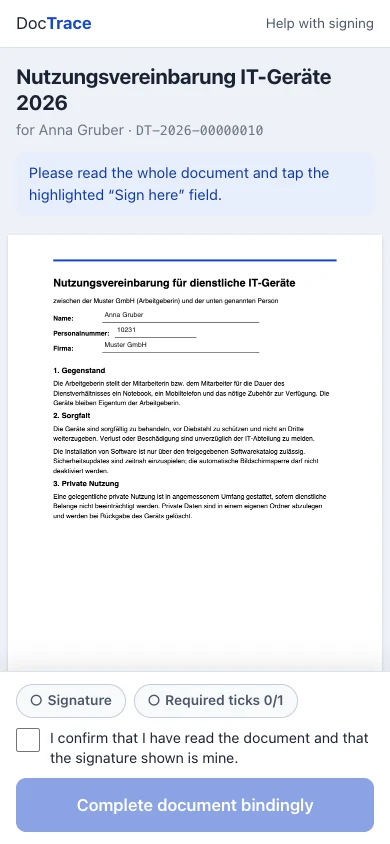
Upload a PDF. DocTrace immediately calculates the checksum of the original.
Place fields
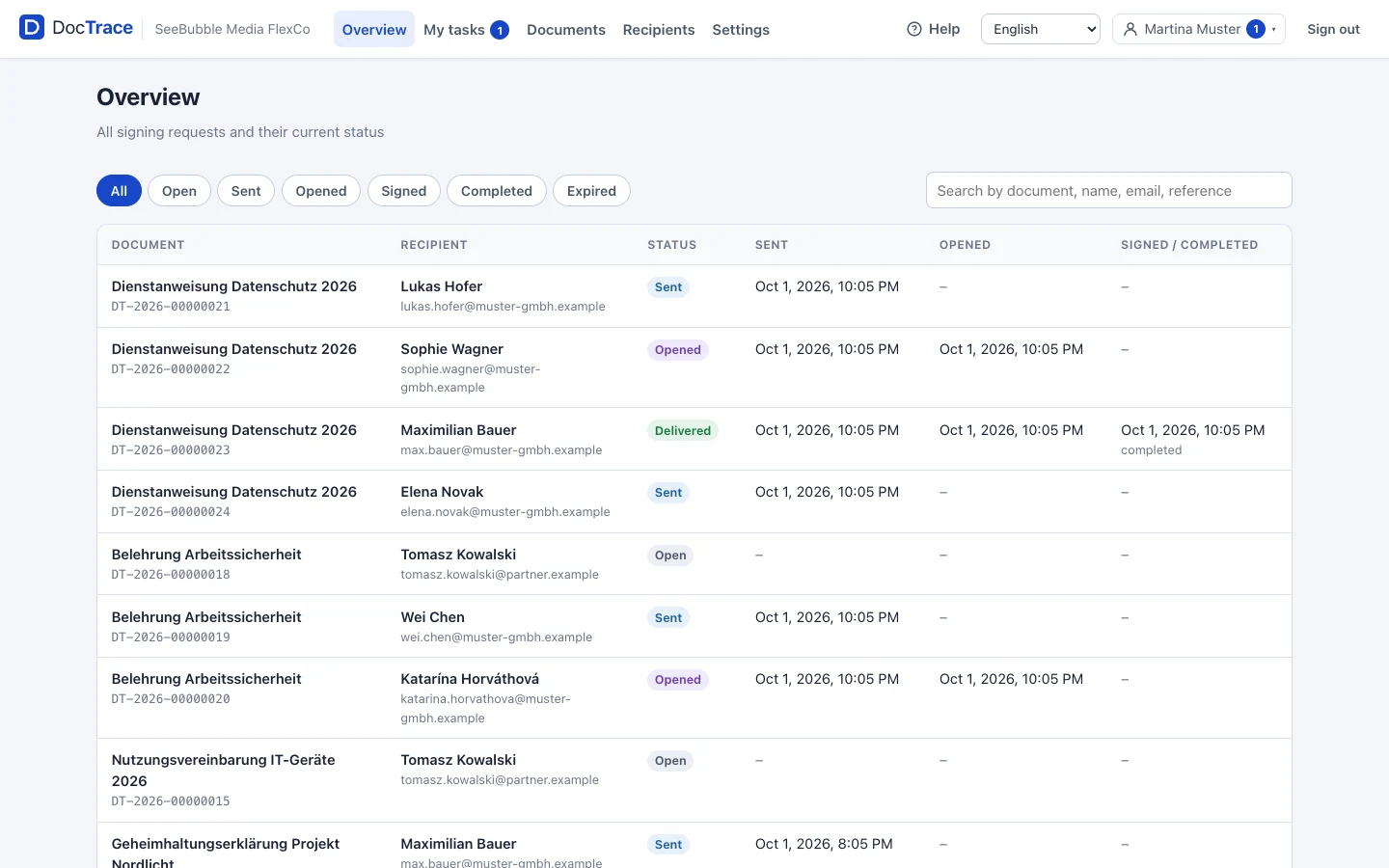
Signature, name, date, checkbox: drag them onto the page. DocTrace fills in name and location from the recipient's master data.
Send
Tick the recipients, choose a deadline, send. Everyone receives a personal link by e-mail.
Done
The person signs with their finger. Both sides receive the same final version with the proof page.
One document, several stages. In the right order.
A purchase approval goes first to management, then to purchasing, then to the warehouse. DocTrace only calls up each stage once the previous one has signed, and shows everyone what has already been signed before them.
- Flexible order
The default order is set on the document. It can be changed whenever a chain is started: purchasing first, then management, if that is what fits this time.
- One signature per stage
A stage is a group, for example "Warehouse". Every member receives a link; whoever signs first completes the stage. The other links become invalid.
- Reject with a reason
If something is wrong, the stage rejects and has to say why. The chain stops, the initiator receives an e-mail, and no final version is created.
- My tasks
Every member sees in DocTrace which stages are currently waiting for their signature and completes them with one click.
External people, such as a supplier, can be a stage as well. They sign via a link, without an account.
Sign first, then receive.
Credentials, tender documents, a data room link: some things may only go out once the signature is in. DocTrace releases them automatically, the moment the person completes the signing.
- Non-disclosure agreement
Then the confidential file or the link to the data room.
- Privacy agreement
Then the personal credentials for the app, individual for each person.
- Confidentiality agreement
Then the tender documents, only for the period you set.
Encrypted
Every file gets its own key. When the release expires, the key is deleted and the file becomes permanently unreadable.
Expires
Available for a period after signing, for example 7 days. If you wish, only a single time.
In the proof
What was released is listed on the proof page and in the audit log: type, title, checksum. Never the content of personal credentials.
Never in the e-mail
The e-mail only states what has been released. Retrieval is via the personal link, never as an attachment, never a password in plain text.
Built to hold up later.
A signature is only as good as the proof behind it. DocTrace records every step so that it can be verified, even years later.
One final version
The signed PDF is generated exactly once. Archive, e-mail attachment and download are identical byte for byte. The SHA-256 checksum proves it.
Chained audit log
Every log entry contains the checksum of the previous one. If anyone alters an entry, the chain no longer matches. DocTrace checks this on every view.
Time from the server only
All timestamps come from the server's clock, never from the person's device. The proof page in the PDF names the time source.
Personal links that expire
Every link belongs to exactly one person and one request, expires, can be revoked and is locked once the request is completed.
Companies strictly separated
Every company has its own data, its own roles and its own audit chain. The separation is enforced in the database, not just in the user interface.
Hosted in Frankfurt
Servers and storage are located in the Google Cloud region Frankfurt (EU). Stored files can be neither deleted nor overwritten.
Transparent support
Our support team can only view your company read-only, only on request, and only for a limited time. Every access is recorded in the audit log and listed for you under "Support access".
From one person to the whole company
You need none of this for a single signature. As your needs grow, DocTrace grows with you.
Users, roles, permissions
Clerk, employee, company admin. Or custom roles with exactly the permissions that are needed.
People without web access
Anyone who only needs to sign gets no login. Warehouse staff are members of a stage and complete their tasks via the e-mail link.
Employees see only what concerns them
An employee sees their own tasks and their own requests, not the documents of the whole company. Permissions decide what each person sees.
Your own mail server or DocTrace delivery
E-mails go out through your SMTP server with your sender address. Or you let DocTrace send them, with no setup.
9 languages
German, English, Spanish, French, Hungarian, Polish, Slovak, Chinese (Simplified and Traditional). Everyone sees their own language.
Help Center
Every feature explained, with diagrams and screenshots, in all languages. For administrators and for signers.
Several companies, one login
Two sites, or several clients if you are a service provider: one account, several companies, cleanly separated.
What companies use DocTrace for
Examples, not customer testimonials. Wherever a sheet of paper is signed and filed away today.
Work instructions
Every employee confirms by signature that they have read the instruction. With a date from the server.
Briefings
Safety briefings and data protection briefings, signed with proof instead of collected in a folder.
Receipt confirmations
Laptop, keys, company car: the handover is confirmed and the final version lands with both sides.
Purchase approvals
Management, purchasing, warehouse: as a document chain in the right order, with rejection and a reason.
Leave requests
The employee submits, the manager approves, HR confirms. Three stages, one document.
External partners
Suppliers or customers sign via a link, without an account, in their own language.
NDA with release
Sign the non-disclosure agreement first, then automatically receive the confidential file.
Clear monthly prices. No surprises.
Every plan includes the proof page, the chained audit log, 9 languages and hosting in Frankfurt. Cancel monthly, billed through our payment partner Paddle.
Included in every plan
- One final version with proof page and SHA-256
- Chained, tamper-proof audit log
- Document chain with stages
- Signers without an account, on their phone
- Users, roles and permissions
- Your own mail server or DocTrace delivery
- 9 languages and Help Center
- Hosted in Frankfurt (EU)
What companies ask us
Is a signature made with DocTrace legally valid?
Do recipients need an account or an app?
Where is the data stored?
Does DocTrace verify the person's identity?
Can I cancel?
Can I use my own mail server?
What if a link expires?
Your next signature in minutes instead of days.
Request a demo or get started right away. We reply personally.